Cardano
How to Stake ADA with Trezor Suite: Step-by-step Guide
A practical guide to staking ADA through Trezor Suite with full key control, on-device confirmation, and a smooth delegation flow using Trezor Safe 7.
DEC 17, 2025
Last updated APR 28, 2026 · V1
Staking ADA through a hardware wallet is a secure and convenient way to participate in the Cardano network while keeping full control over your keys. The new Trezor Safe 7 features a refreshed interface, enhanced security protections, and an optimized staking flow within Trezor Suite, making the process straightforward, even for first-time users.
While this guide focuses on the new Trezor Safe 7, ADA staking is available on all Trezor hardware wallets that support Cardano. The staking flow remains the same across devices, with on-device confirmation used for every delegation.
In this guide, you will learn what’s new about the Trezor Safe 7, how ADA staking works, and how to delegate your ADA step-by-step using Trezor Suite.
About Cardano and ADA Staking
Cardano is a Proof-of-Stake blockchain where users can delegate their ADA to validator pools to support the network’s operation and receive periodic protocol-based rewards.
Delegation does not lock your funds; your ADA stays in your wallet and remains fully accessible for sending or spending at any time.
Why stake ADA with the Trezor Safe 7?
- 0% operator fee for the first four months when delegating through Trezor Suite with Everstake
- Full control over your private keys
- Delegation happens locally through secure signing on the device
- Trezor Suite provides a clear and transparent UI for checking delegation status, pending epochs, and protocol payout periods
- Safe 7 offers an updated confirmation flow with enhanced visibility for each step
About the New Trezor Safe 7
Trezor Safe 7 is the latest addition to Trezor’s lineup of hardware wallets. It is designed to provide high-grade protection for crypto assets with a colour touchscreen, Secure Element (TROPIC01), secure Bluetooth connectivity, faster performance, and an updated user experience.
The device integrates directly with Trezor Suite, enabling users to manage assets, review transactions on the device’s screen, and interact with staking options without exposing their private keys.
How to Stake ADA with the Trezor Safe 7: Step-by-Step Guide
Below is the full process based on the interface shown in your screenshots.
Step 1. Connect your Trezor device
- Launch the Trezor Suite application on your computer or navigate to the web app
- The application will guide you through the process.
- Connect the device if you haven’t already, plug your Trezor into the computer and enter the PIN on the device to unlock it.
- Once connected, the Suite will detect your Trezor and prompt you to authenticate the device and begin the setup process (if it’s new) or show your existing wallet.
Step 2. Select your Cardano account
- In the left-side menu of Trezor Suite, choose Cardano #1 (or the ADA account you want to use).
- Inside the account view, tap Explore staking.

You will be taken to the staking overview page, where the basic delegation information are shown.
Step 3. Start the staking flow
- Press Start staking.
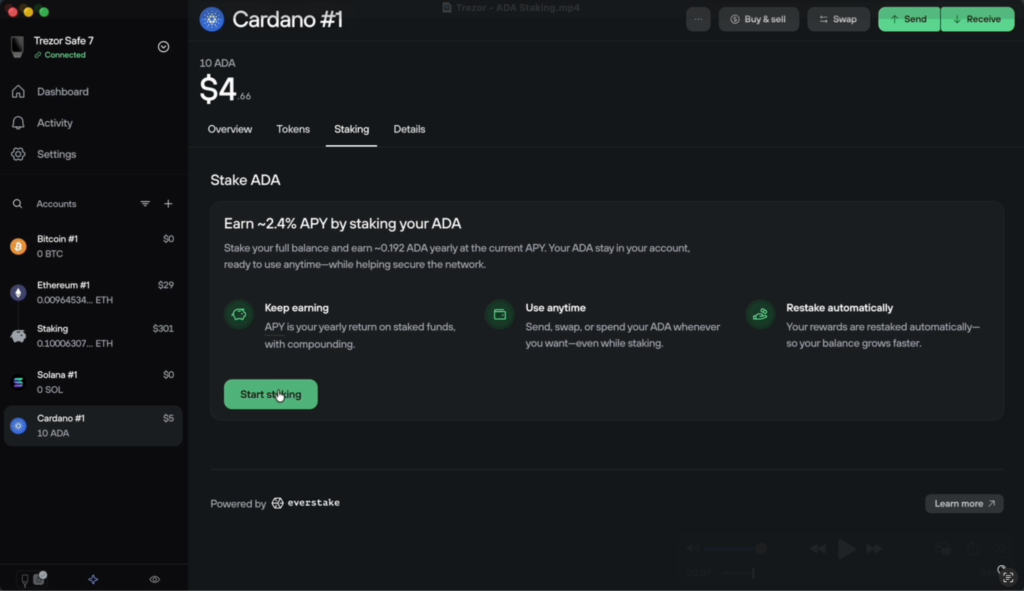
This opens a pop-up with a brief explanation of the Cardano staking process, including activation times and reward periods.
- Tap Continue.
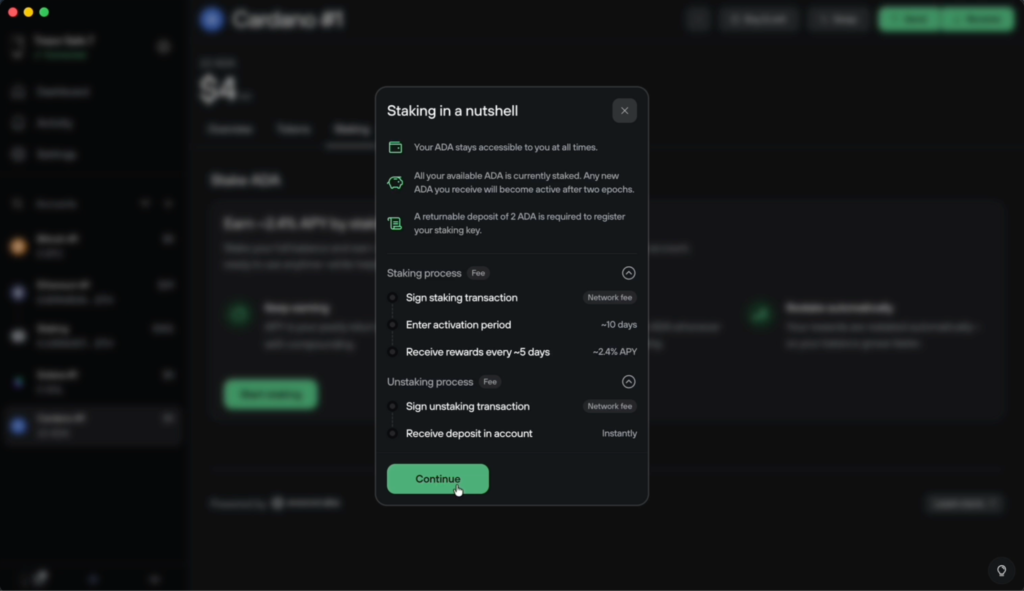
Step 4. Review delegation details
- You will see a window describing staking details.
- Tick the checkbox confirming that you understand the information.
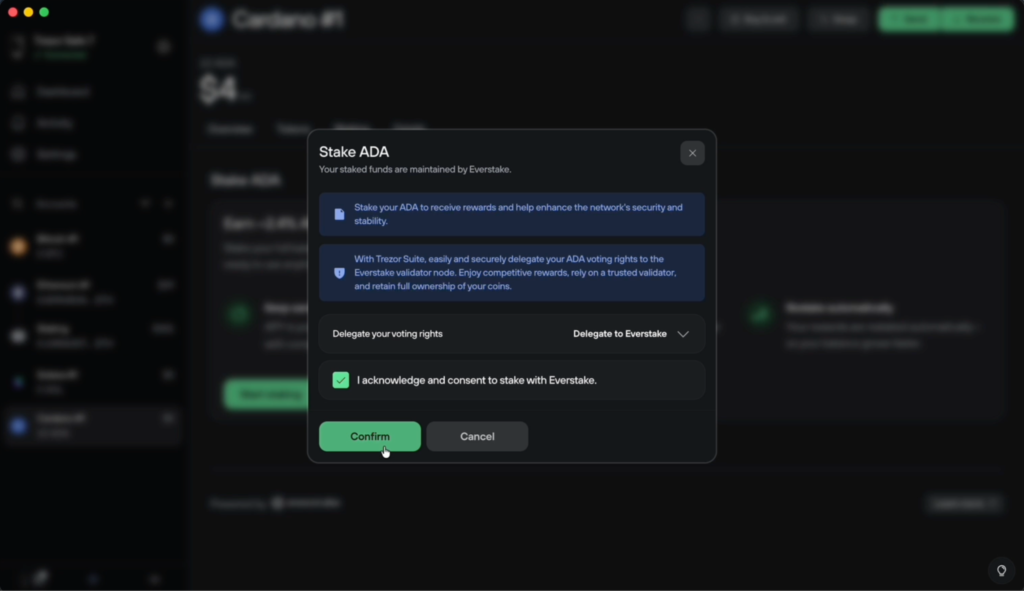
- Tap Confirm.
Step 5. Choose the staking amount
The next screen displays:
- Your available balance
- The ADA refundable registration deposit
- The network fee for the transaction
- Ensure everything is correct, then click Continue.
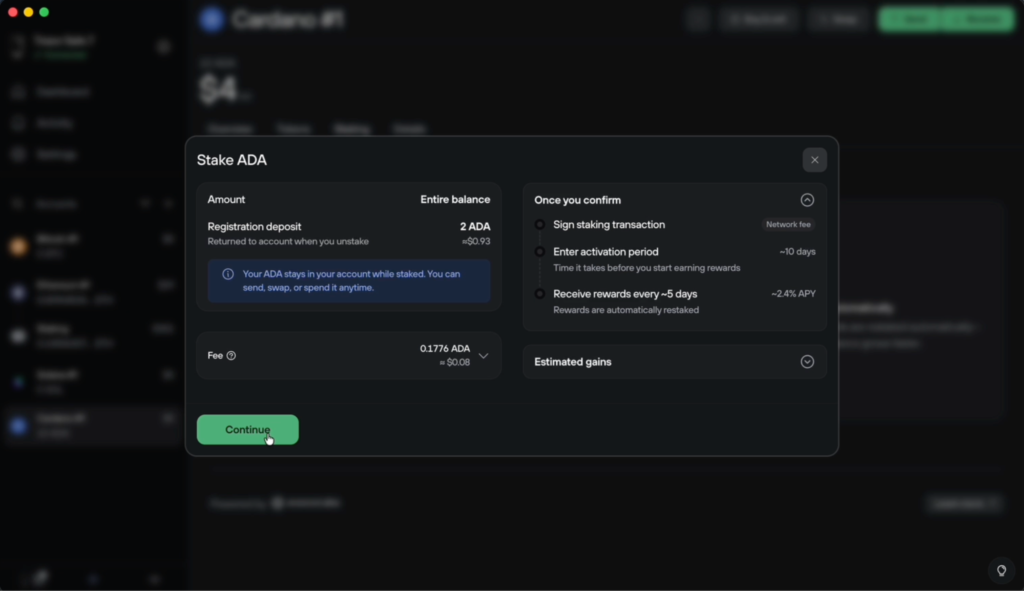
Step 6. Confirm the action on your Trezor Safe 7
A prompt will appear asking you to confirm the delegation on the device.
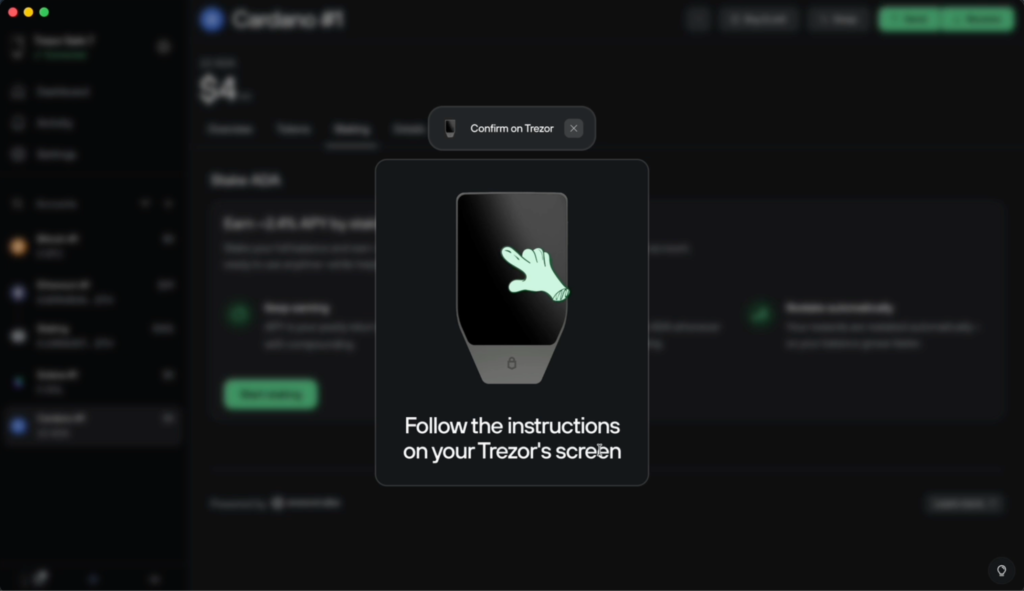
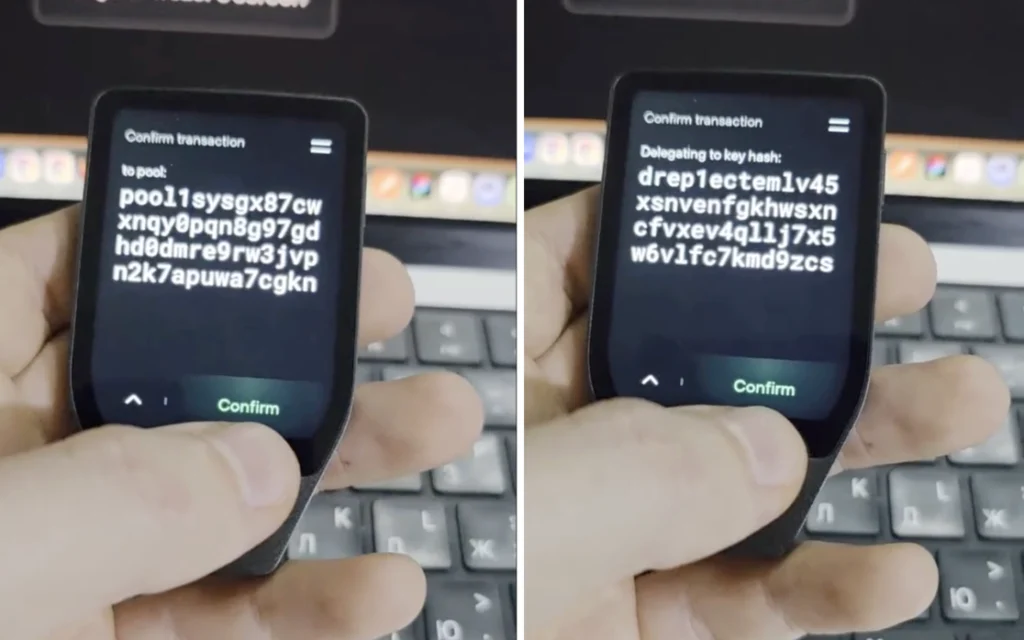
Follow the instructions shown on the Safe 7 screen and approve the staking transaction.
Tap Confirm on the device to proceed with the transaction.
You will see your staking amount on the Trezor device. Hold the button to confirm.
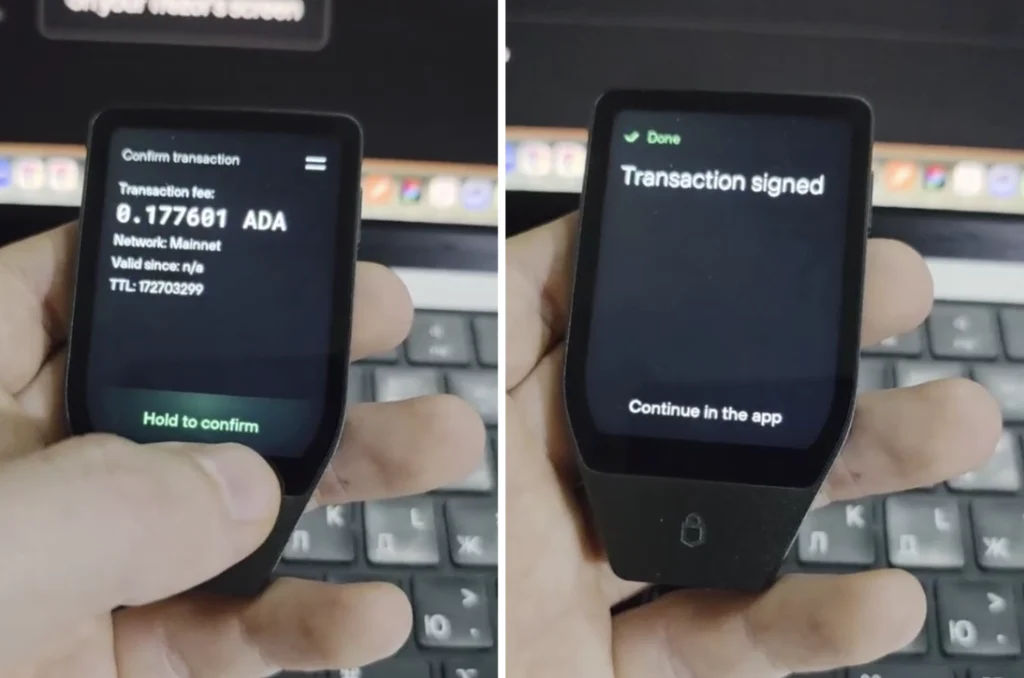
Step 7. Staking initiated
After confirmation, Trezor Suite will show:
- Confirming transaction
- The activation period (~10 days)
- The time until the receiving of rewards (~5 days after activation)
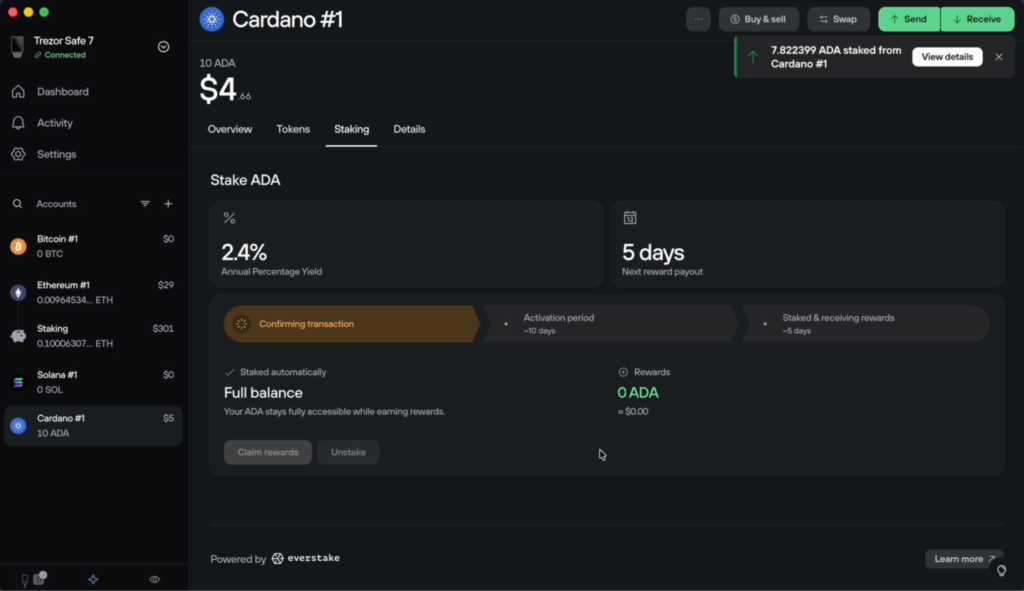
- Your ADA remains in your account throughout the entire process.
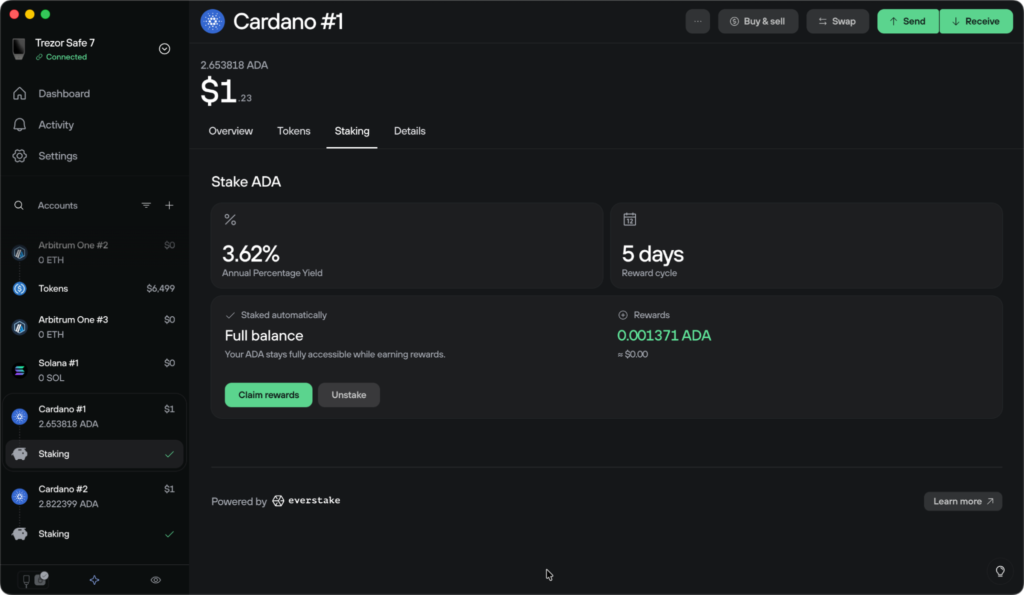
- After the activation period (approximately two epochs), the staking status will automatically update from pending to active, and the rewards counter will become visible in the staking dashboard.
- The first protocol payout is typically received in the following epoch after activation.
How to migrate your ADA stake to Everstake?
As of November 2025, the default Cardano staking provider in Trezor Suite was changed from 5binaries to Everstake. Users who are still delegated to the previous provider are recommended to migrate in order to continue receiving protocol rewards.
To update your staking provider:
- Open the Staking dashboard in Trezor Suite
- Click Update provider when prompted
- Review and approve the transaction
- Confirm the action on your Trezor device
A small network fee applies for the migration, while the original 2 ADA registration deposit remains valid. For a detailed walkthrough, refer to the official Trezor guide.
Conclusion
Staking ADA with the Trezor Safe 7 is a straightforward and secure process thanks to the improved hardware experience and clear interface in Trezor Suite. You maintain full control of your funds, while delegation occurs through a transparent process with on-device confirmation.
With these steps, your ADA is now successfully delegated, and the Cardano network will recognize your participation after the activation period has passed. When staking through Trezor Suite with Everstake, the operator fee is set to 0% for the first four months, giving you an additional benefit during the initial delegation period.
***
All metrics displayed on the website, including without limitations value of staked assets, total number of active users, rewards rates, and networks supported, are historical figures and may not represent the actual real-time data.
Share with your network