solana
Staking Guides
How to Stake SOL via MetaMask Portfolio with Everstake: Guide for Mobile
Everstake brings reliable Solana staking to MetaMask Portfolio. Secure, non-custodial, effortless. This guide shows how to proceed.
OCT 29, 2025
Last updated JUL 09, 2026 · Vv3
You don’t need to be at your desk to grow your SOL holdings. MetaMask now supports Solana accounts, so you can hold SOL and connect to Everstake to stake.
Everstake is featured in the Discover section of MetaMask Portfolio. With Everstake you can stake your Solana, making it possible to delegate your tokens straight from your phone or desktop. Everstake easily integrates with your MetaMask wallet, so there’s no need to install extra software.
This article explains how to stake your SOL with MetaMask Portfolio using mobile. We’ll look at why staking matters, how Everstake fits into the Solana ecosystem, and give you clear, step-by-step instructions so you can start staking in just a few minutes.
Why Stake SOL?
Solana is one of the fastest blockchains in the world, processing thousands of transactions per second with ultra-low fees. Its native token, SOL, powers the network and staking SOL is your way to contribute to its decentralization and security.
When you stake, you delegate your SOL to a validator who helps confirm transactions and produce blocks. That’s where Everstake comes in.
Solana changed minimum amount of stake from 0.01 SOL to 1 SOL as of June 18, 2026. The change affects only new stakes. No action is required from users.
Check out the current minimum delegation amount on our staking dashboard.
Why stake with Everstake?
Reliability: Everstake runs secure, audited infrastructure and has supported over 130 networks.
Non-custodial: You stay in control of your funds at all times.
Trust: Everstake has surpassed the milestone of 1.6 million lifetime users.
Ease: No need to install anything extra, just use your existing MetaMask wallet.
Step-by-Step Guide For Staking SOL
Follow these steps to stake your SOL tokens.
Step 1. Find Everstake Staking Dashboard on MetaMask
- Open MetaMask, tap on the Explore tab at the bottom of the screen
- Tap on the search bar,start typing: metamask.everstake.one
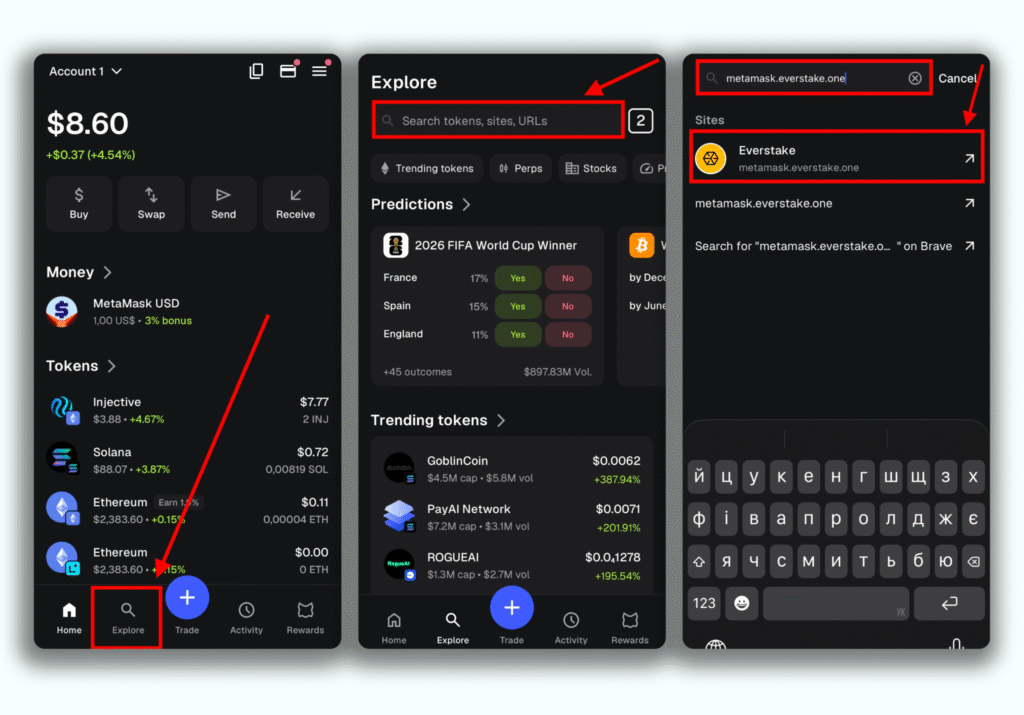
- It will open the Everstake Staking Dashboard with current details on the staking rewards rate, applicable fees and stake activation duration.
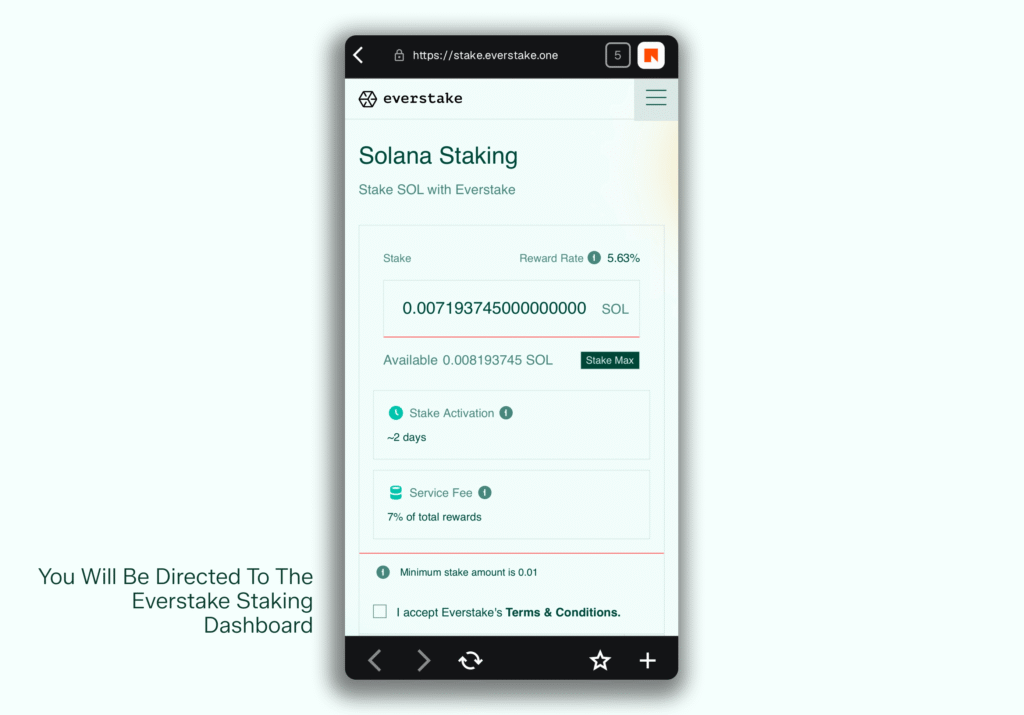
Step 2. Stake Your SOL
- In the Stake field, enter the amount of SOL you want to stake, or tap Stake Max to use your entire available balance.
- Make sure to leave a small amount of SOL in your wallet to cover network fees.
- Review and accept the Terms & Conditions and tap Stake Now.
- A transaction request will pop up, prompting you to check your transaction details and tap Confirm.
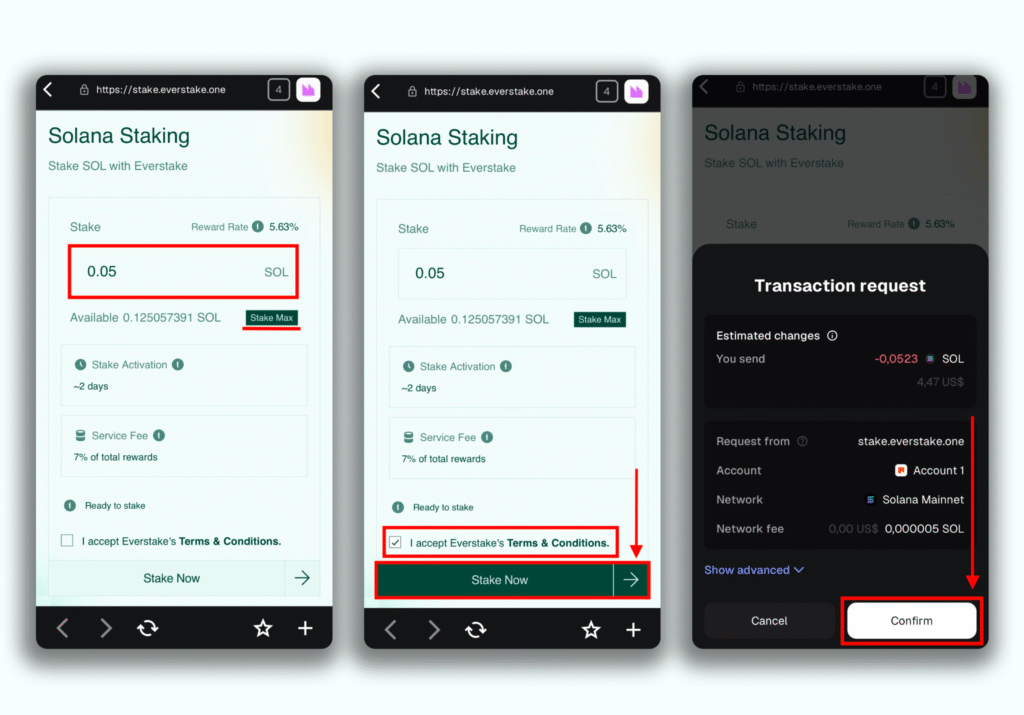
All done! You successfully staked your SOL.
Step 3. Check Your Staking Status
Once the transaction is successfully processed, your SOL will be staked with Everstake.You can check your staking status anytime in the Dashboard section of the Everstake Staking Dashboard.
Want to stake ETH instead? Check out our guide: How to stake ETH via MetaMask Portfolio with Everstake.
How to Unstake your SOL?
Step 1. Connect the Wallet
- Navigate to the Everstake Staking Dashboard and tap on Connect Wallet.
- Tap Connect to approve the connection on the pop-up.
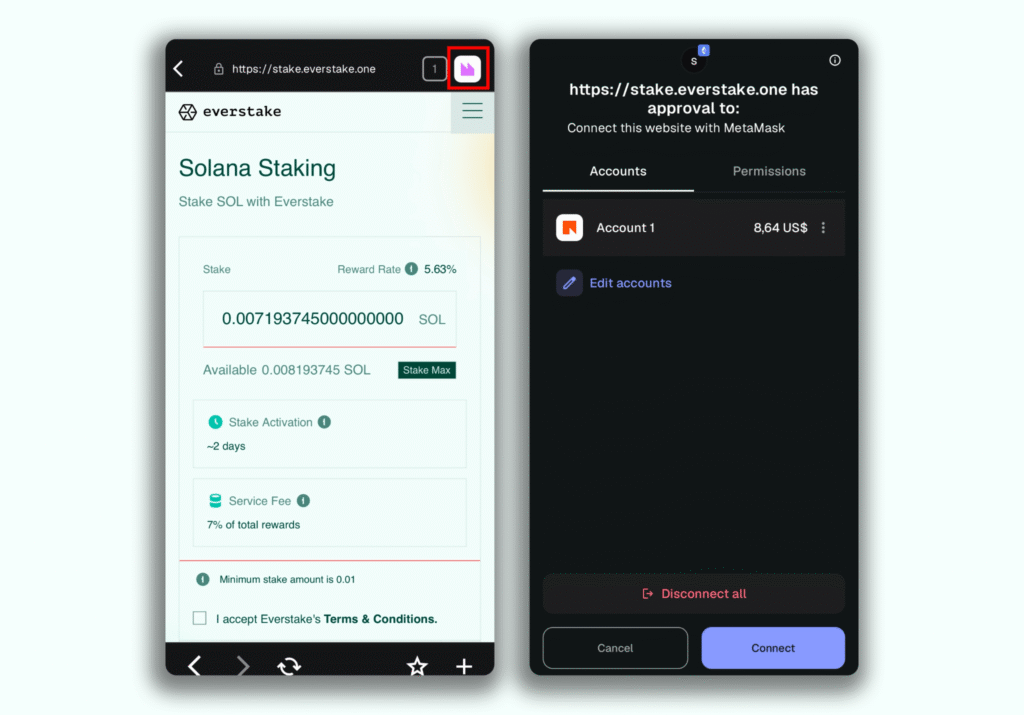
Step 2: Request Withdraw
- Scroll down and click on Request Withdraw.
- Enter the amount you want to unstake, review and accept the terms, then tap on Request Withdraw.
- A transaction request will pop up, prompting you to check your transaction details and tap Confirm.
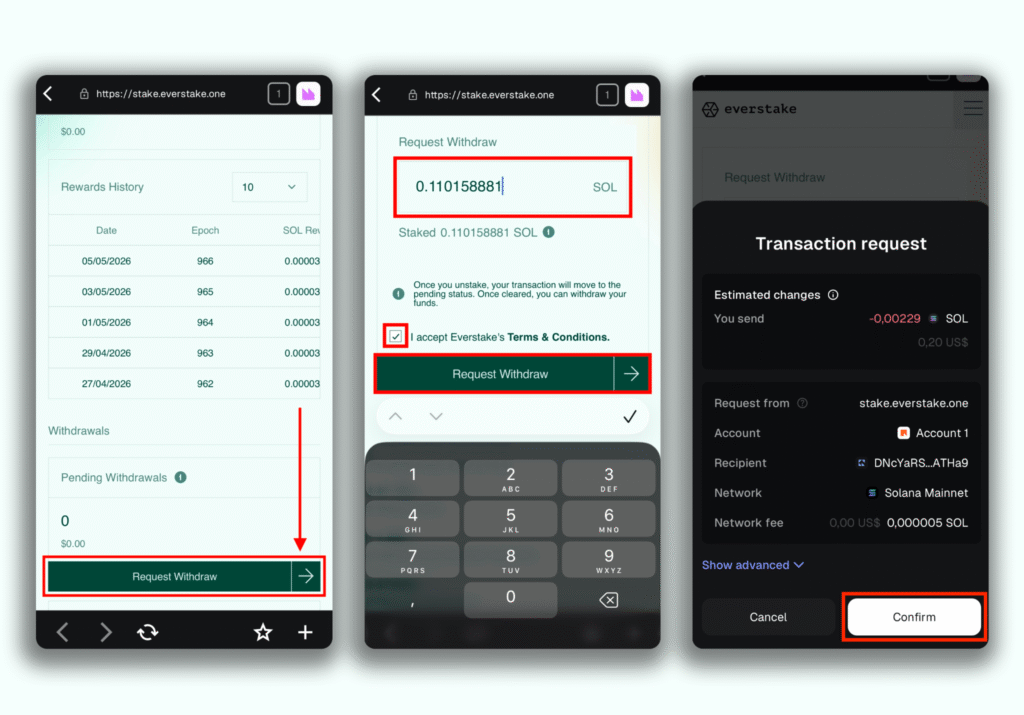
Step 3: Make a Withdrawal
IMPORTANT: Withdrawal will become available 1 epoch later (~2 days) after Unstake (Request Withdraw) is done due to Solana network specifics.
- Tap to open the Menu bar on the Staking Dashboard at the upper right corner of the screen.
- Choose Solana from the list.
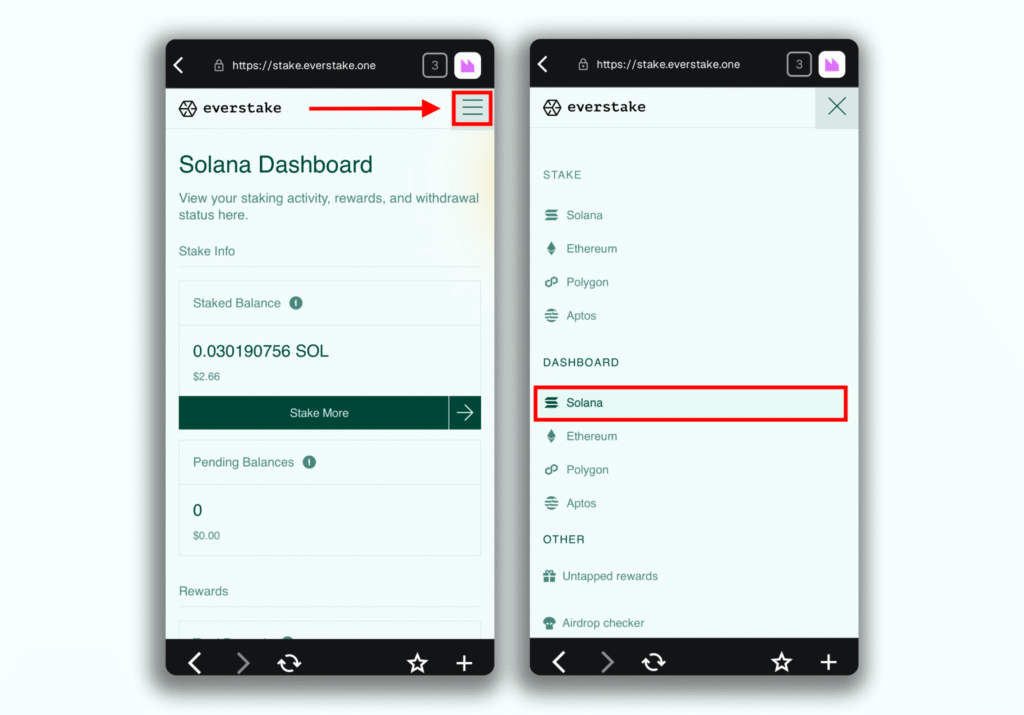
- Scroll down and you’ll see the Withdrawals section. Tap on Withdraw.
- Review and accept the terms and click Claim Now.
- In a few seconds, a transaction request will pop up, prompting you to check your transaction details and tap Confirm.
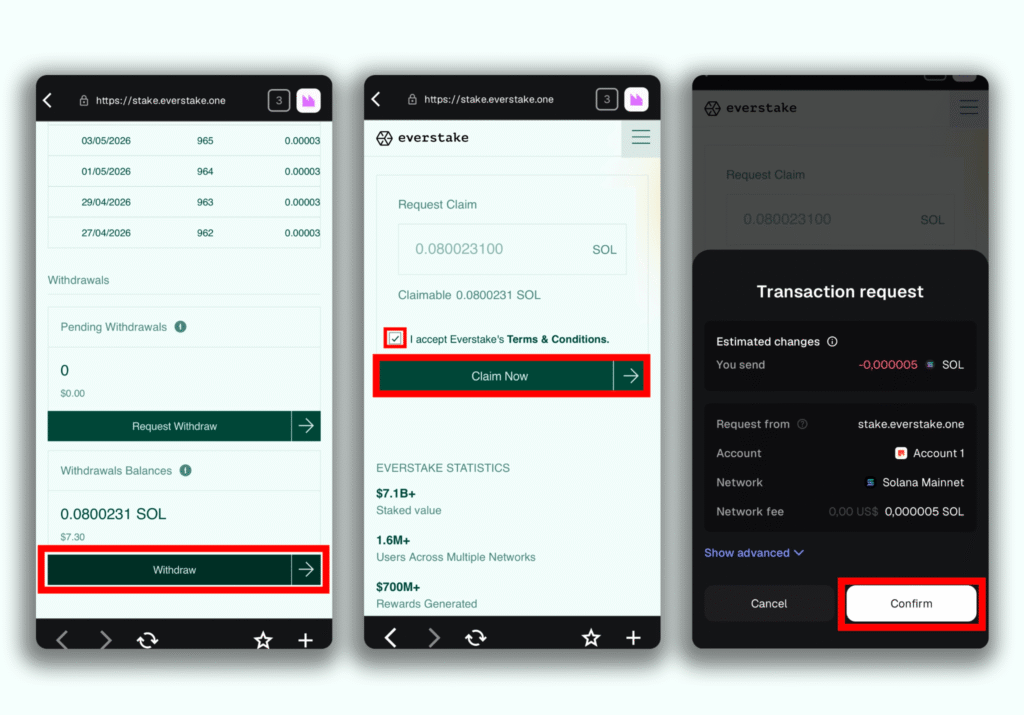
That’s it! You’ve successfully unstaked your SOL.
Bottom Line
Staking doesn’t have to be complicated or time-consuming. With Everstake as a featured partner in MetaMask Portfolio you can easily access reliable validator services and put your SOL to work in just a few taps. Everything happens in one familiar interface, so there’s no steep learning curve or extra setup.
By staking, you can receive rewards and help keep Solana fast, secure, and decentralized. Whether you’re on the go or at home, this is one of the simplest ways to make your tokens part of the network’s growth.
Disclaimer
Everstake is a software platform that provides infrastructure tools and resources for users but does not offer investment advice or investment opportunities, manage funds, facilitate collective investment schemes, provide financial services, or take custody of, or otherwise hold or manage, customer assets. Everstake does not conduct any independent diligence on or substantive review of any blockchain asset, digital currency, cryptocurrency, or associated funds. Everstake’s provision of technology services allowing a user to stake digital assets is not an endorsement or a recommendation of any digital assets by it. Users are fully and solely responsible for evaluating whether to stake digital assets.
Share with your network