ethereum
How to Stake ETH via Trezor Safe 7: Guide for the new devices
A step-by-step guide to staking ETH via Trezor Safe 7. Learn how staking works inside Trezor Suite and what to expect from the process.
DEC 23, 2025
Table of Contents
What Is Trezor?
Why Stake Ethereum?
How to Stake ETH via Trezor Suite: Step-by-Step Guide
Conclusion
Share with your network
Ethereum utilises a Proof-of-Stake (PoS) mechanism, enabling users to contribute to the network’s security by locking their ETH in a staking contract. Staking is a widely used method for supporting the protocol and receiving regular network rewards based on validator performance.
This guide explains how staking works through Trezor and walks you through each step of staking ETH via Trezor Suite using Everstake as the validator.
What Is Trezor?
Trezor is a hardware wallet designed to keep crypto assets secure by storing private keys offline. It offers a protected signing environment for all transactions, including staking operations.
Trezor Safe 7, the latest model
The newest model, Trezor Safe 7, introduces several upgrades:
- A larger and brighter touchscreen
- Dual secure elements, including TROPIC01, the world’s first transparent and auditable secure element.
- Bluetooth compatibility and a more intuitive interface
Other Trezor models
Trezor also offers other devices, such as Trezor Model T, Trezor Safe 5, and Trezor Safe 3, each with different security and interface options. All models support essential Ethereum operations, but Safe 7 provides the newest UX and hardware-level improvements.
Why Stake Ethereum?
Staking ETH plays a fundamental role in maintaining Ethereum’s PoS consensus. When you stake your ETH, it is temporarily locked and helps validate transactions and secure the network.
Key points:
- You support Ethereum’s network operations,
- Your ETH participates in validator duties,
- You receive protocol-level rewards generated by the PoS mechanism,
- Rewards are distributed regularly and restaked automatically when supported by the provider.
This guide focuses on staking via Trezor Suite, where Everstake operates the underlying validator infrastructure.
How to Stake ETH via Trezor Suite: Step-by-Step Guide
Below is a clear process based on the Trezor Suite interface and the steps.
Step 1. Open Trezor Suite and go to your Ethereum account
- Connect your Trezor device.
- In the left sidebar, select Ethereum #1 (or another ETH account).
Step 2. Click Explore staking
- At the top of the account page, you will see an informational banner showing the current APY.
- Tap Explore staking.
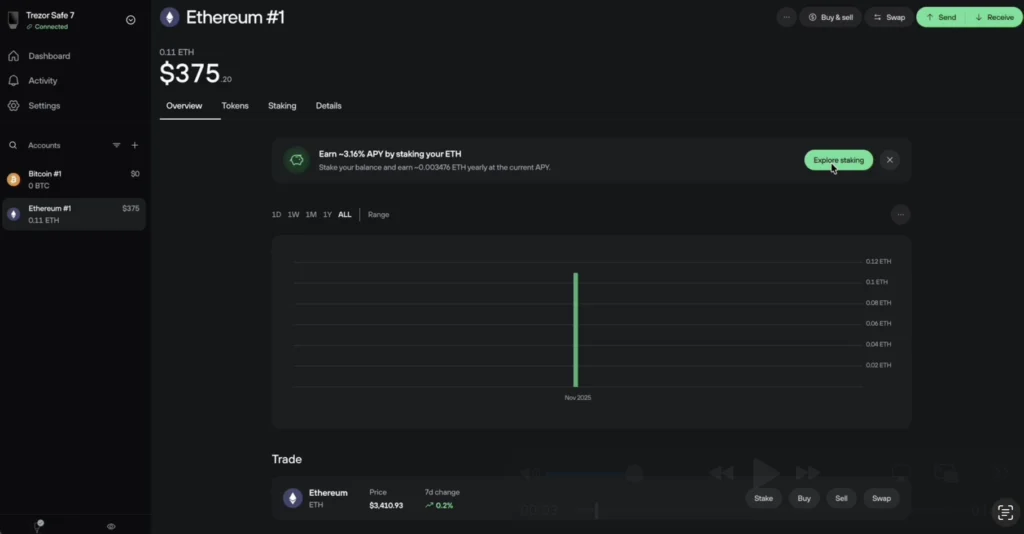
Step 3. Review the staking overview
- A new panel will open with a summary of staking with Everstake.
- Click Start staking to continue.
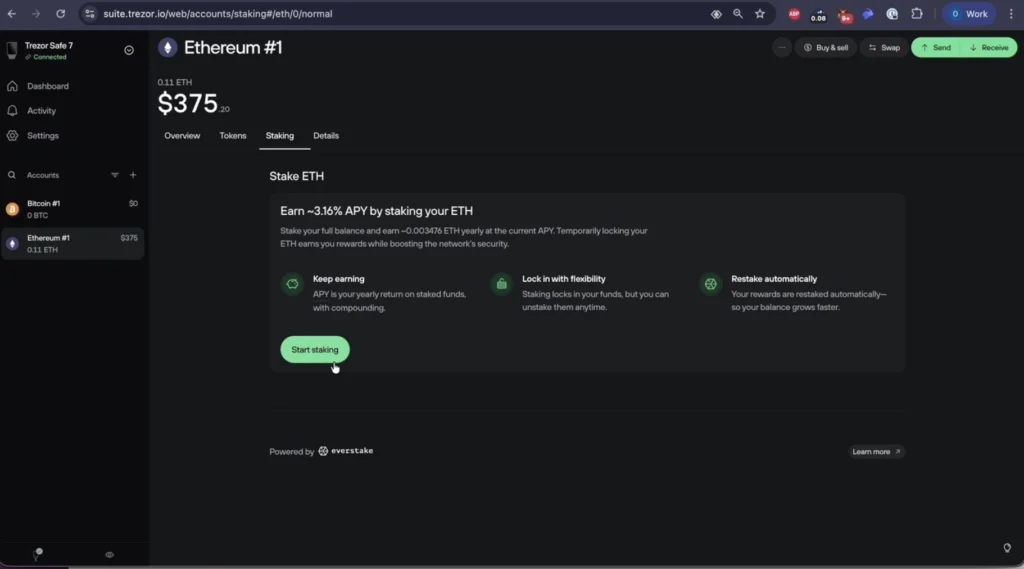
- Check the Staking in a nutshell information.
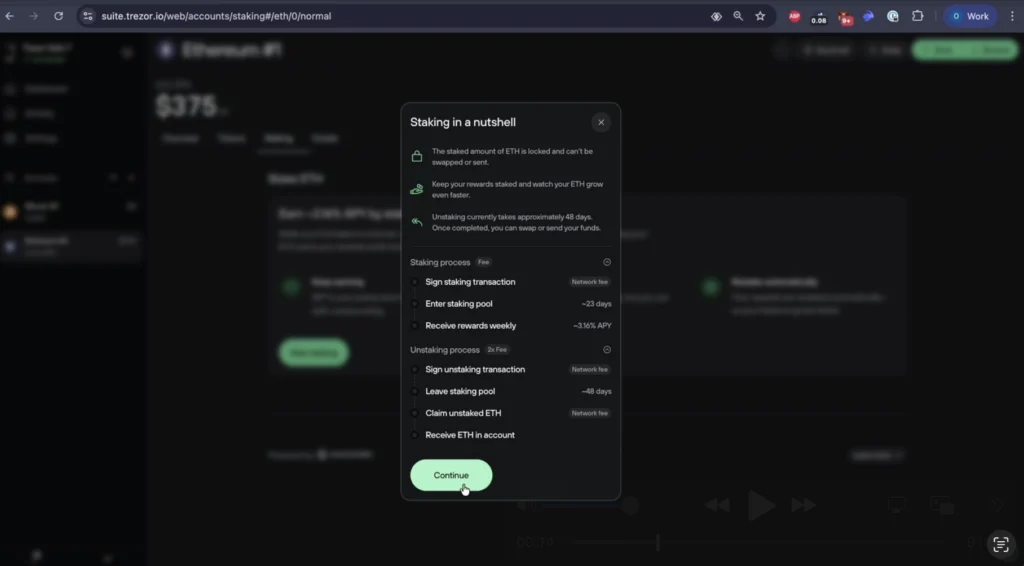
You will see: Locking conditions, Estimated entry period (~23 days), Approximate unstaking time (~48 days), and Reward distribution schedule
- Press Continue.
Step 4. Acknowledge the consent message
A window will appear explaining that:
- Everstake maintains and protects staked ETH using its smart contracts and infrastructure.
- Security responsibility for the staked funds transitions from your Trezor to Everstake.
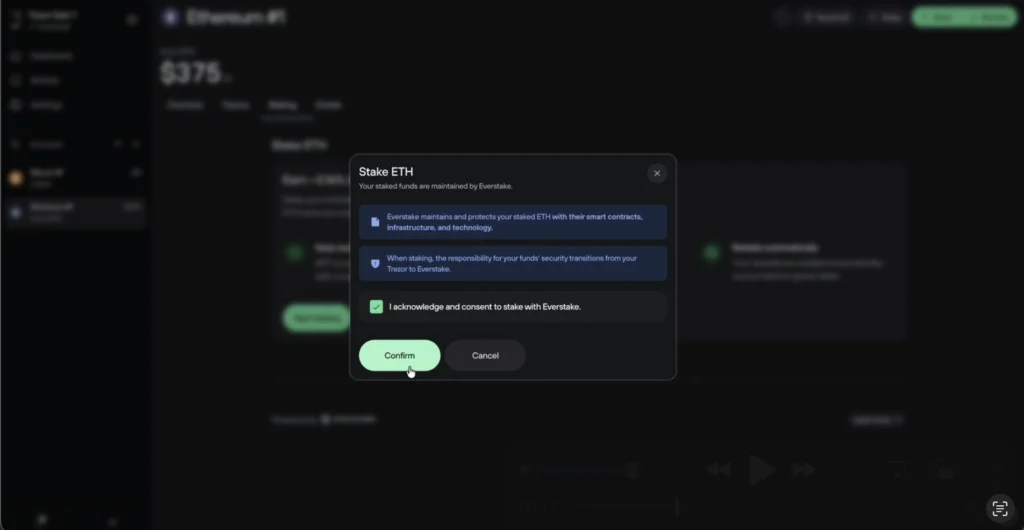
- Tick the checkbox I acknowledge and consent to stake with Everstake.
- Then tap Confirm.
Step 5. Enter the amount
- Specify the amount (for example, 0.1 ETH).
- Trezor Suite will remind you to leave some ETH for future network fees.
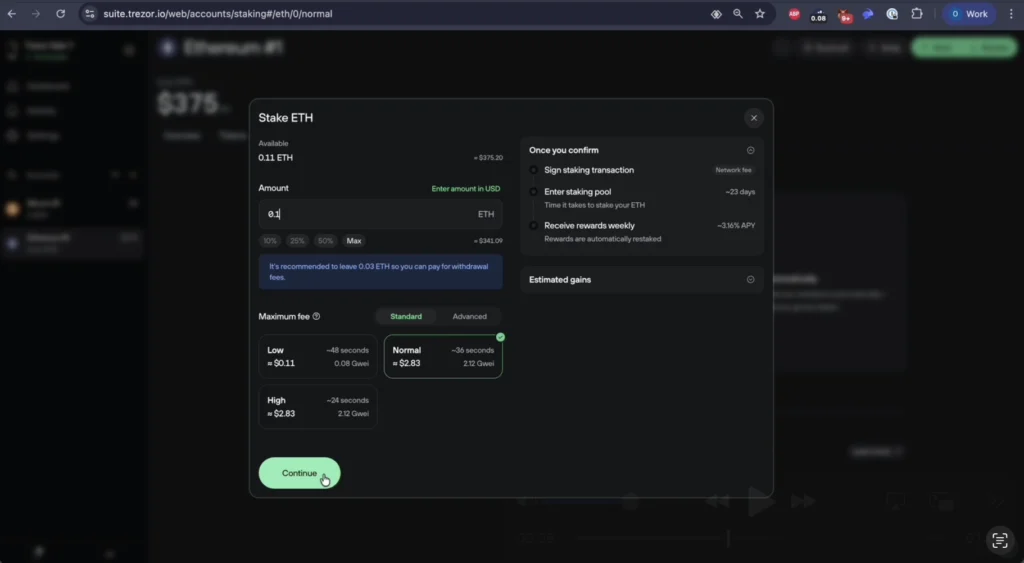
- Tap Continue.
Step 6. Acknowledge the entry period
A pop-up will state:
- Entering the staking pool may take up to 23 days.
- Your ETH will be blocked during this time and cannot be reversed.
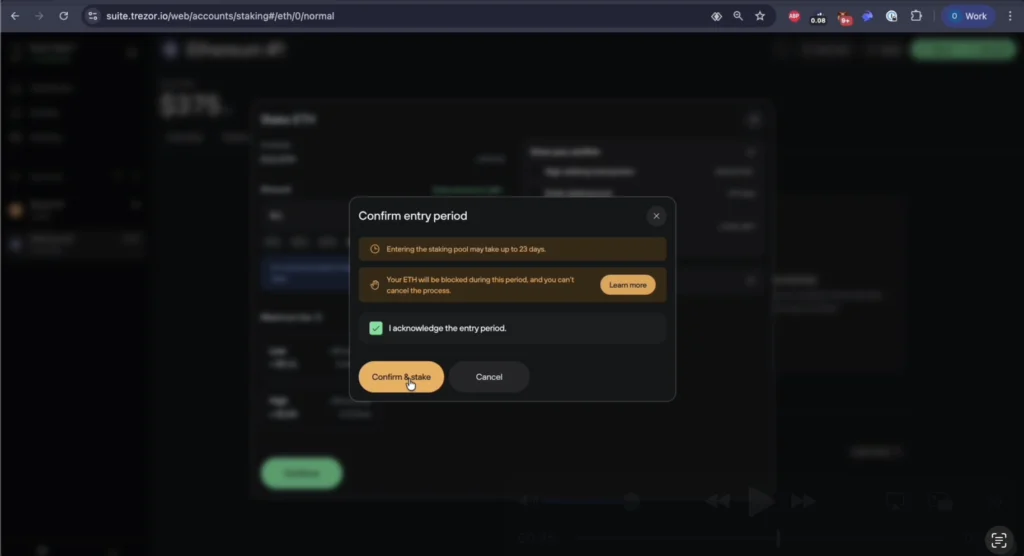
- Check the box and click Confirm & Stake.
Step 7. Confirm the transaction on your Trezor device
Your Trezor will display all transaction details:
- Amount
- Maximum fee
- Contract interaction
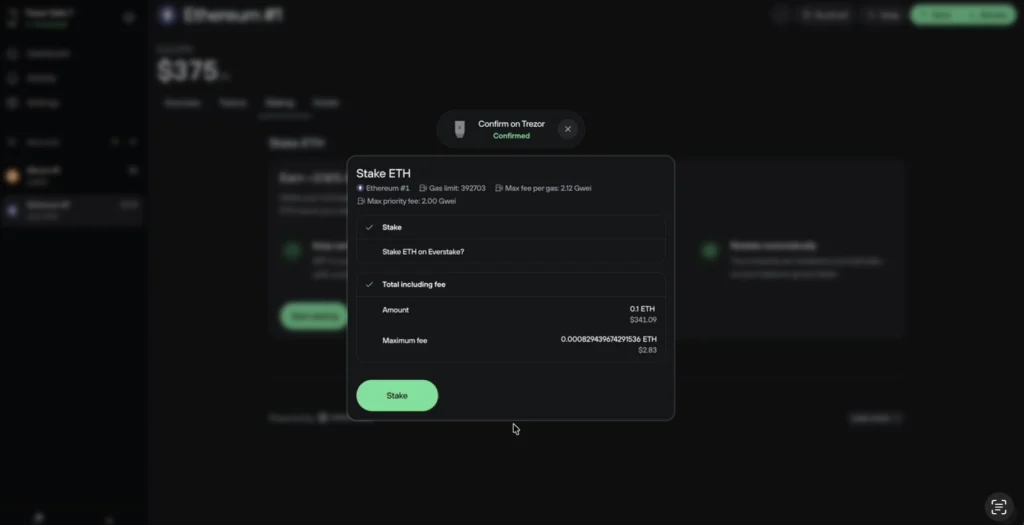
- Review and approve on the device.
- After confirmation, tap Stake in Trezor Suite.
Step 8. Wait for the transaction to process
A pending transaction will appear in your account.
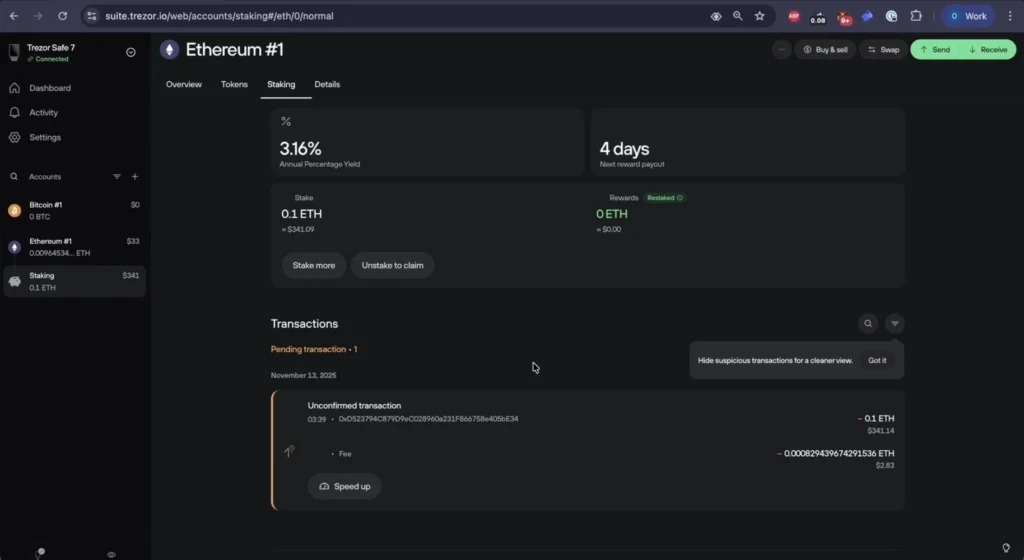
Once confirmed on the network, your staked ETH will appear under a new Staking section in the left sidebar.
Conclusion
Staking ETH through Trezor Suite provides a secure and transparent way to participate in Ethereum’s Proof-of-Stake validation. By using a Trezor hardware wallet, you keep control over your keys while delegating validator operations to Everstake. Once your staking transaction is confirmed, you will see your staking position and reward schedule directly in your Trezor Suite dashboard.
***
All metrics displayed on the website, including without limitations value of staked assets, total number of active users, rewards rates, and networks supported, are historical figures and may not represent the actual real-time data.
Share with your network
Related Articles

ethereum
The ABCs of Crypto
Tax Implications of stETH vs. wstETH Rewards 2026 Update
How are stETH and wstETH staking rewards taxed in 2026? Compare rebase vs. value-accrual models, IRS updates, and tax-optimization strategies for Ethereum liquid staking.
MAR 23, 2026
ethereum
Ethereum Strawmap: The Five North Stars Explained
Strawmap is the Ethereum Foundation’s most ambitious long-range protocol roadmap to date, outlining major upgrades through 2029 targeting speed, scale, privacy, and quantum-proof security. It devises a course from today’s 12-second blocks and ~15 TPS to a future where L1 settles transactions in seconds at 10,000 TPS, rollups handle 10 million TPS, and cryptographic security...
MAR 09, 2026
ethereum
Leading by Example: The Ethereum Foundation Commits 70,000 ETH to Treasury Staking
The Treasury Staking Initiative enhances Ethereum’s economic security while serving as a masterclass in validator decentralization through the use of minority clients and distributed signing tools. This proactive move demonstrates that institutional-scale staking can be both non-custodial and transparent.
MAR 03, 2026
Disclaimer
Everstake, Inc. or any of its affiliates is a software platform that provides infrastructure tools and resources for users, but does not offer investment advice or investment opportunities, manage funds, facilitate collective investment schemes, provide financial services, or take custody of, or otherwise hold or manage, customer assets. Everstake, Inc. or any of its affiliates does not conduct any independent diligence on or substantive review of any blockchain asset, digital currency, cryptocurrency, or associated funds. Everstake, Inc., or any of its affiliates, providing technology services that allow a user to stake digital assets, does not endorse or recommend any digital assets. Users are fully and solely responsible for evaluating whether to stake digital assets.
Sign Up for
Our Newsletter
By submitting this form, you are acknowledging that you have read and agree to our Privacy Notice, which details how we collect and use your information.