
Partnership
solana
Staking Guides
How to Stake SOL Using Digital Shield Wallet: Step-by-Step Guide
Digital Shield’s hardware wallet app lets users delegate SOL to Everstake directly from the built-in DeFi tab, with every transaction signed inside a CC EAL6+ secure chip. Private keys never leave the device, and the undelegation cooldown follows Solana’s standard one-epoch period of roughly 2 days.
JUN 01, 2026
Last updated JUN 19, 2026 · V1
TL;DR
- You can now stake SOL directly from the Digital Shield hardware wallet app.
- Staking flow is simple and consists of a few steps: select an amount, review the details, and confirm on your hardware device.
- Every transaction is signed on hardware device before being broadcast to the network.
- The staking provider is Everstake, a non-custodial validator operator active on Solana since the network’s earliest days, with over $7B in total staked assets and 99.98% observed uptime.
- Neither Digital Shield nor Everstake takes custody of your assets at any point; ownership stays with you.
About Solana and SOL Staking
Solana is a high-throughput Proof-of-Stake network that processes thousands of transactions per second through a combination of PoS consensus and its native Proof-of-History mechanism.
Validators on Solana are responsible for voting on blocks, confirming transactions, and maintaining network liveness. When you stake SOL, you delegate your tokens to a validator, contributing to network security and becoming eligible for protocol-distributed staking rewards.
Solana changed minimum amount of stake from 0.01 SOL to 1 SOL as of June 18, 2026. The change affects only new stakes. No action is required from users.
Check out the current minimum delegation amount on our staking dashboard.
Unlike Ethereum, Solana staking does not require a minimum stake amount to delegate. Rewards are distributed at the end of each epoch (approximately 2 days), and users can undelegate at any time, with the cooldown period lasting one epoch.
Choosing a high-quality validator matters on Solana because validator performance directly affects reward consistency. Key factors include uptime, commission rate, and network participation quality, which are part of Everstake‘s operational standard.
About Everstake’s Solana Infrastructure
Everstake has operated as a Solana validator since the network’s mainnet launch, making it one of the earliest and most experienced staking providers in the ecosystem.
Beyond standard validator operations, Everstake runs two performance-layer products specific to Solana:
- ShredStream: a low-latency shred propagation service that improves block data availability across the network, benefiting validators and builders who need fast access to block data.
- SWQOS: a stake-weighted Quality of Service product that helps transactions receive prioritized forwarding by leveraging Everstake‘s validator stake weight on the network.
About Digital Shield
Digital Shield is a self-custody hardware wallet ecosystem for users who want hardware-grade key protection without giving up day-to-day usability.
Private keys are generated and stored inside a CC EAL6+ certified secure chip. The same certification tier is typically used in financial- and military-grade systems. The chip operates fully offline, so keys are never exposed to any internet-connected environment regardless of what the paired phone is doing.
The companion mobile app connects to the hardware device via Bluetooth and handles everything above the key layer: portfolio tracking, multi-chain asset management, DeFi interactions, and transaction broadcasting.
- Every transaction is assembled in the app and sent to the device for signing.
- The signed output is returned and broadcast, and the private key never moves.
Digital Shield supports hundreds of digital assets including: Solana, Ethereum, Bitcoin, etc. The firmware is fully open-source and has been independently audited by CertiK.
Why Stake SOL with Digital Shield
- Hardware-isolated signing. Delegation transactions are signed inside the CC EAL6+ secure chip, never in the app or on the phone. The network receives only the signed output. Your private key doesn’t move.
- Staking without leaving the app. The DeFi tab is built into Digital Shield‘s interface, everything happens in one place, with no external websites or third-party dApps involved.
- Clear, scoped flow. Enter an amount, review the delegation details, and confirm on the hardware device.
- Full ownership throughout. Your keys stay on the device whether you’re staking, reviewing your position, or initiating a withdrawal. Digital Shield or Everstake never holds or accesses your assets.
Staking SOL with Digital Shield Wallet: Step-by-Step Guide
The staking infrastructure provider is Everstake. Check out the SOL staking flow inside the Digital Shield mobile app.
Important! Make sure you have:
- The Digital Shield hardware wallet and companion mobile app configured and ready to use
- Enough SOL on your balance to stake (starts from 0.01 SOL) and cover Solana network fees (Solana transaction fees are typically under $0.001)
Step 1. Connect Your Account
Turn on your Digital Shield hardware wallet and open the companion mobile app.
If this is your first time, complete the in-app setup to pair the device. For returning users, make sure Bluetooth is active and the hardware wallet is connected.
Once paired, the main screen displays your balance across all networks and lists your assets below.
Step 2. Check the Balance
On the wallet home screen, confirm your SOL balance.
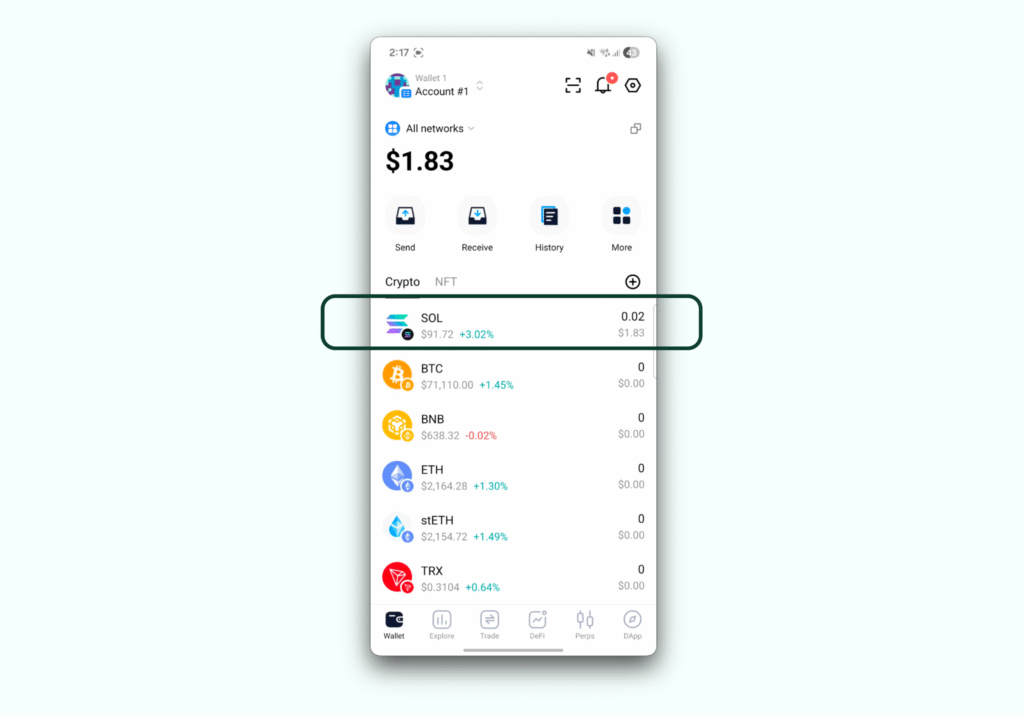
Set aside a small amount of SOL for the network fee. Solana transaction fees are typically under $0.001,
Step 3. Start the Staking Flow: Press the DeFi Tab, Then Select “Earn SOL”
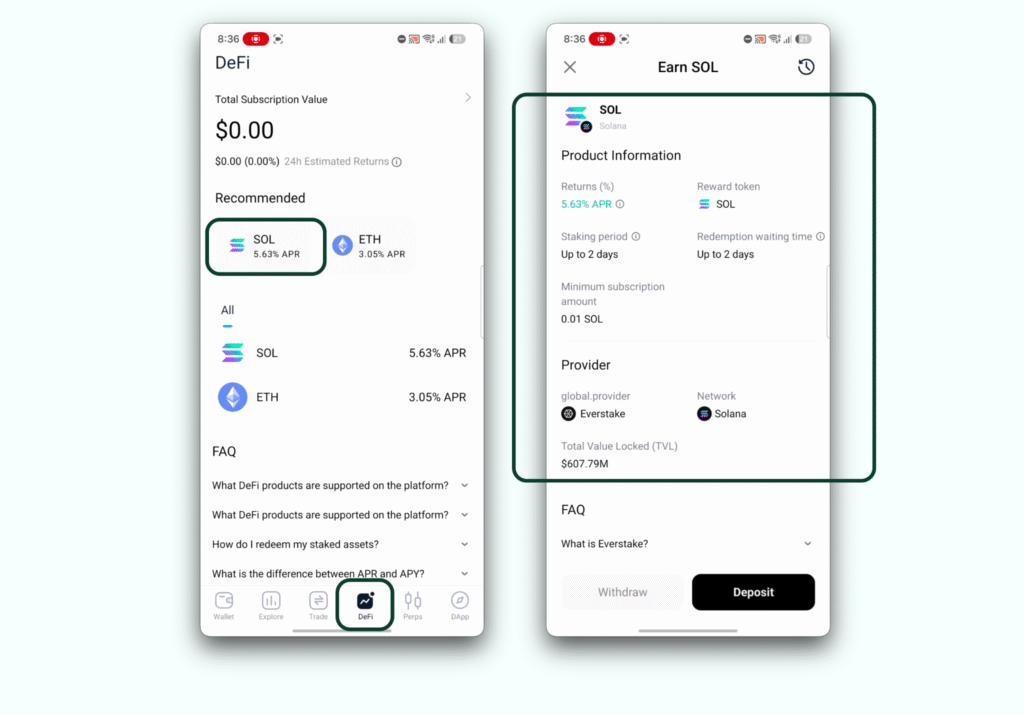
Tap the DeFi tab in the bottom navigation bar.
Under the Recommended section and the All list, you will see SOL listed with its current APR. Tap SOL to open the staking product page.
Step 4. Review Delegation Details
Before committing any SOL, review the Product Information on the “Earn SOL” screen:
- Product Information
- Returns % (APR): in SOL
- Redemption waiting time: ~1 epoch (approximately 2 days)
- Minimum subscription (staking) amount
- Staking provider: Everstake
- Total Value Locked (TVL)
- Network: Solana
The redemption waiting time reflects Solana‘s standard undelegation cooldown of one epoch. These are standard parameters for Solana staking through Everstake‘s infrastructure.
When you are ready, tap Deposit.
Step 5. Choose the Staking Amount
On the Earn SOL screen, enter the amount of SOL you want to stake. The app displays the USD equivalent in real time. You can use the 25%, 50%, 75%, or 100% quick-select buttons, or tap Max to stake the full available amount.
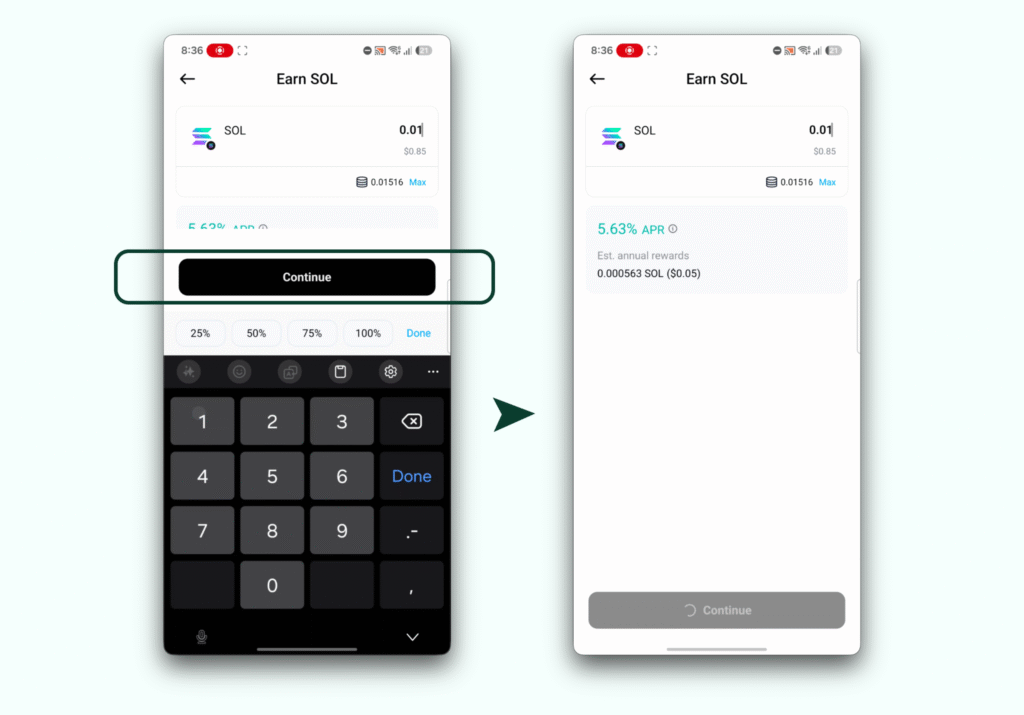
Below the amount entry, the app shows the estimated annual rewards based on your potential staked assets.
Enter the amount, tap Continue.
Step 6. Confirm the Action in Your Digital Shield Wallet
A transaction confirmation screen titled Deposit will appear, summarizing:
- Staked amount
- Pay address: your wallet address
- Interact with: the staking contract address
- Network Fee
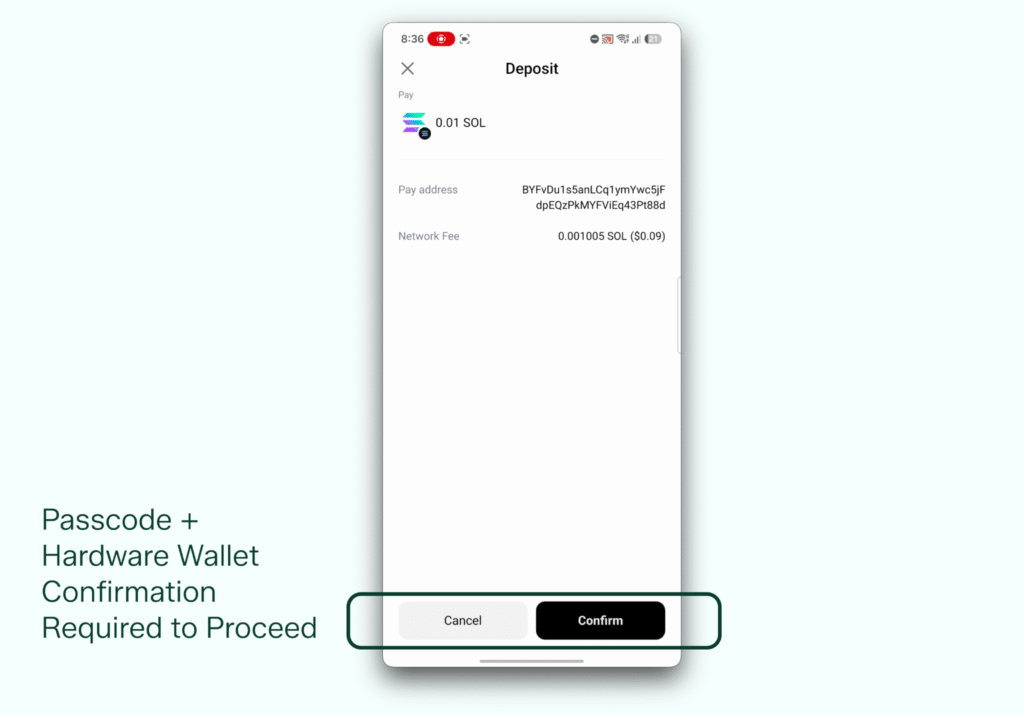
Review these details. Check that the pay address matches your Digital Shield account, and the contract address corresponds to Everstake‘s staking infrastructure on Solana.
If everything looks good, tap Confirm.
- You may be prompted to enter your passcode and confirm on your paired hardware device.
- The signing happens inside the secure chip, and the signed transaction is then broadcast to the network.
Step 7. Staking Initiated
When the transaction is confirmed, the app displays the “Earn SOL” product page with a Transaction submitted notification at the top of the screen.
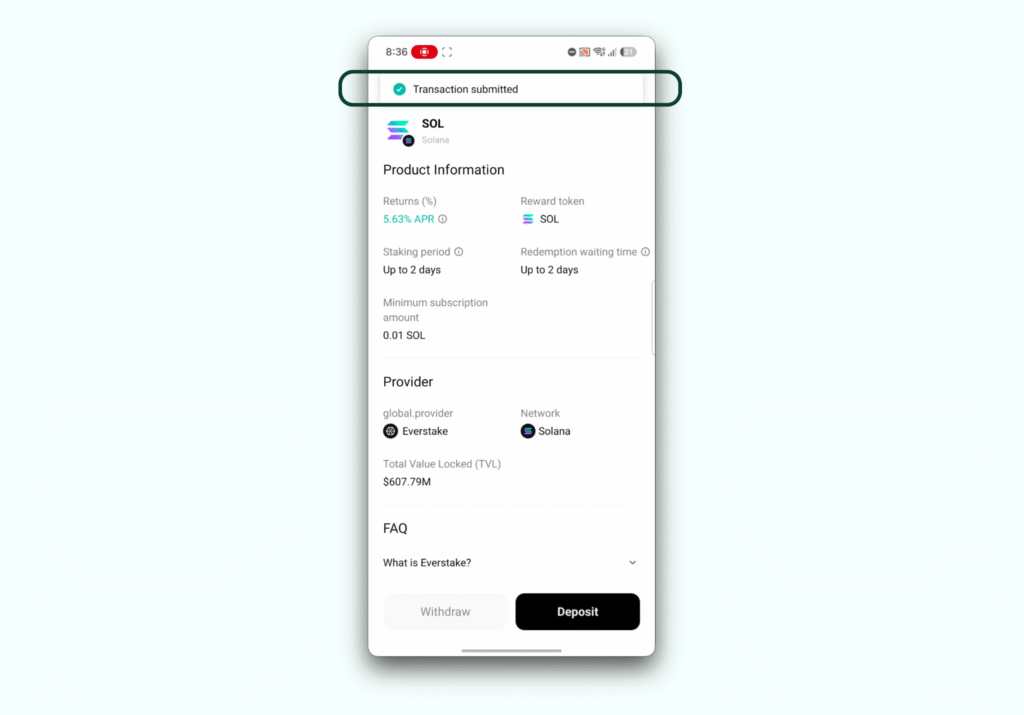
The product information shows the current delegation parameters.
Your SOL staking position is now active. The Withdraw button becomes available once your position is established and the withdrawal conditions are met.
Reviewing Your Staking Position
To monitor your position at any time, tap the DeFi tab.
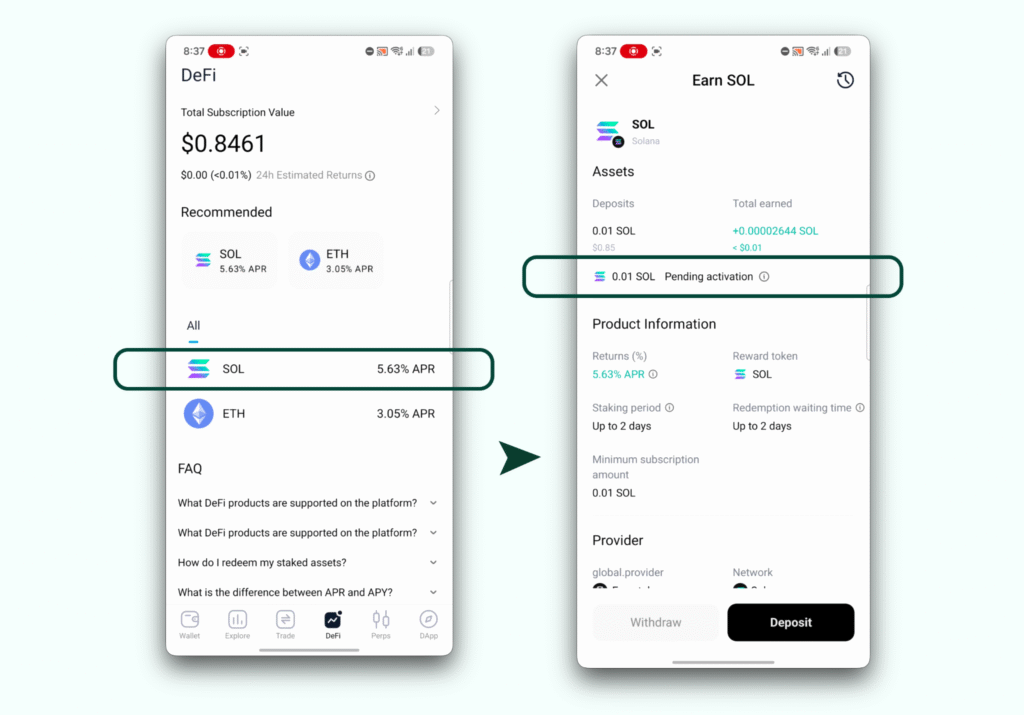
Your Total Subscription Value reflects the staked amount. Tap SOL in the list, you will be able to view your current position, staking duration, and TVL. From this screen you can also add more SOL or initiate a withdrawal.
About Everstake and Digital Shield Partnership
Everstake is a leading global non-custodial staking provider founded in 2018, trusted by over 1.6M users with approximately $7B in staked assets with experience onboarding 130+ networks. Everstake maintains 99.98% uptime and holds SOC 2 Type II and ISO/IEC 27001:2022 certifications.
When you delegate, Everstake‘s validators handle block production and reward distribution, but your assets never leave your control. Delegation and withdrawal are always signed by the Digital Shield app user.
The partnership with Digital Shield, announced in February 2026, pairs hardware-grade key isolation with proven validator infrastructure for Ethereum and Solana staking. Neither party takes custody of user assets at any point.
Frequently Asked Questions
Is there a minimum amount of SOL I need to stake through Digital Shield?
There is no protocol-enforced minimum for Solana staking. The minimum amount displayed in the Digital Shield app is 0.01 SOL.
Do I need to connect to an external website or dApp to stake SOL?
No. The entire staking flow happens inside the Digital Shield app through the built-in DeFi tab.
Who is the staking provider behind SOL staking in Digital Shield?
SOL staking is powered by Everstake, a non-custodial staking provider with over $7B in total staked assets to date. Everstake has operated as a Solana validator since the network’s earliest days and runs additional Solana-native infrastructure including ShredStream and SWQOS.
Do I keep control of my SOL when I stake through Digital Shield?
Yes. Your private keys never leave the hardware device, and neither Digital Shield nor Everstake takes custody of your assets at any point.
How long does it take to get my SOL back after I decide to withdraw?
The undelegation cooldown on Solana is approximately one epoch, which is roughly 2 days. After initiating a withdrawal in the app, your SOL will become available once that epoch completes.
What staking rewards can I expect when staking SOL through Digital Shield?
Staking rewards on Solana vary based on network conditions, total stake, and validator performance. The current rate is always visible in the Product Information section of the DeFi tab.
Disclaimer:
The terms “Returns”, “Earn”, “Subscription”, and other similar financial descriptors shown in the screenshots are illustrative and part of the Digital Shield Wallet user interface. These terms are used for navigational and educational purposes only. Their appearance in this guide does not constitute a guarantee of profit, an offer of financial services, or an endorsement by Everstake.
The information provided is not intended for recipients residing in the United Kingdom.
Share with your network