Company News
Liquid staking in pSTAKE from Persistence: comprehensive guide
pSTAKE is the first liquid staking application on the Cosmos Hub to improve asset staking potential. In the alpha version of pSTAKE, custome
JUN 29, 2021
Last updated JUN 29, 2021 · V1
On June 15, Persistence developers launched an alpha version of a new product called pSTAKE, in which users can convert cryptocurrency into tokens, stake them and widely use them within the DeFi industry, thanks to the IBC functionality of transferring between different networks, receiving rewards for both staking and participating in DeFi activities. This version of the product supports ATOM staking in test mode.
pSTAKE is the first liquid staking application on the Cosmos Hub to improve asset staking potential. In the alpha version of pSTAKE, customers have a chance to experience the customer journey converting test ATOM into ERC-20 wATOM and pATOM tokens at a 1:1 ratio. At the moment, all pSTAKE processes take place in the Ethereum and Atom testnets in order to identify possible bugs and improve the UX.
To see the whole picture of pSTAKE we highly recommend reading related articles from the Persistence team:
It is worth mentioning that when pSTAKE goes live on mainnet networks, customers should stake their crypto assets directly after purchasing or they could unstake their existing stake to stake again through pSTAKE to benefit its wide functionality. In the latter customers will face an unstaking period (21 days for Cosmos ATOM), however, in the next version of pSTAKE staking rewards will be compensated for this period from a specially designed redemption pool.
All Persistence products will additionally benefit XPRT token stakers, who will be rewarded by the part of generated commissions from products, including pSTAKE, Comdex, and other upcoming solutions. You may learn how to stake XPRT token from our guides:
- How to Delegate XPRT in Persistence Wallet
- How to Delegate Persistence (XPRT) in Cosmostation Crypto Wallet
On the website, you can find detailed documentation on staking in pSTAKE, but we decided to prepare our own step-by-step guide that will help everyone who wants to quickly master in pSTAKE and help the Persistence team to improve the application by identifying bugs and inconsistencies.
We’ll show you how this works with specific examples so that you can get ready for the next pSTAKE version launch (expected soon in July) where real assets will be used.
1. How to connect to pSTAKE
To access the pSTAKE application visit the website and click on the Launch pSTAKE button.

As you see on the next screen, to get access you need to install an IBC compatible wallet, we recommend MetaMask wallet (the Google browser extension).

After installing MetaMask, select the Ropsten test network inside the MetaMask wallet.

For future transaction fees, you’ll need some gas. To get 1 test ETH:
– copy your ETH address from the wallet;
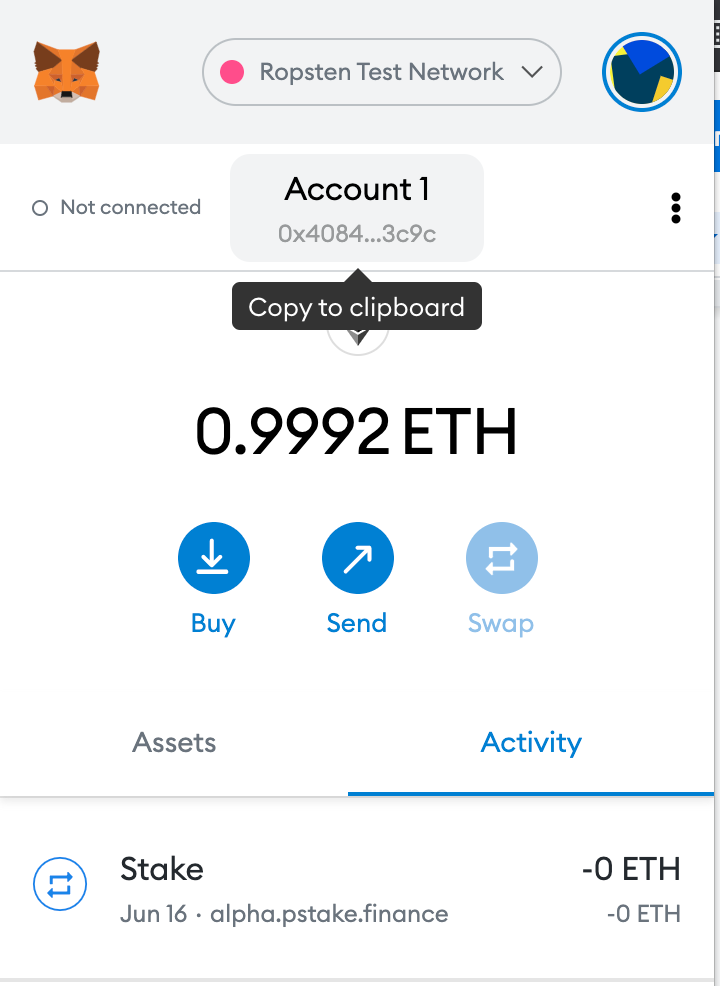
– visit the Ropsten Ethereum faucet website, paste your address in the field and your Metamask Ropsten balance will be promptly increased automatically;
– check the Metamask wallet balance and make sure that the balance is replenished by 1 ETH.
2. How to Convert ATOM and Stake wATOM
Enter pSTAKE, selecting MetaMask.
To get wrapped ATOM click on Wrap on the left side of the screen and in the Deposit section with active field ATOM and inactive field wATOM appears which serve for wrapping your ATOMs to wATOMs.

But do not rush to enter the amount of ATOMs for wrapping up, you have to get test ATOM first.
There are 3 options to deposit ATOMs to the pSTAKE: via Keplr, Ledger, or Cosmos SDK CLI. In the pSTAKE alpha version, you can use Keplr for this purpose.
- install Keplr Google browser extension;
- select pSTAKE Alpha testnet chain and copy wallet address by clicking on it;
- to top up Keplr wallet with test ATOMs you need to go to the Persistence discord channel in pSTAKE tab, find there bug-bounty-faucet channel, and write the message: $request <your Keplr wallet address>

- check your Keplr wallet balance: approximately in a 1-2 min it should have 10 ATOM at the balance;
Now you can replenish pSTAKE balance with wATOM:
- come back to the Wrap menu point the amount you want to wrap up, click on Wrap

- Select Keplr and Approve transaction in appeared Keplr extension interface

(Note: in Keplr you may choose txn fee, and if for testing it doesn’t matter for later wrapping native ATOMs it is better to pay attention to this aspect)
- if the transaction was successful, a corresponding pop-up message will be shown at the page bottom

- Check the wATOM balance on the right side of the interface, it may take some time for wATOM to be displayed.
Now you can stake your wATOM, turning them to pATOM:
- click on Stake and write the amount of wATOM you want to stake

- in the Metamask wallet that appeared, click Confirm

(Note: in Metamask you may choose gas limit, though for testing it doesn’t much matter, but later dealing with real assets it is better to pay attention to this aspect)
- if the transaction was successful, a corresponding pop-up message will be shown at the page bottom;
- Soon you’ll see pATOM balance change on the right side of the interface that means you’ve started earning staking rewards which could be claimed anytime just by clicking Claim Now! under your balances.

After clicking Claim Now! MetaMask wallet appears again for transaction confirmation. Push confirm and in a few minutes your wATOM balance will be replenished with rewards! MetaMask wATOM balance will be shown simultaneously.

3. How to withdraw rewards
To withdraw your rewards in ATOM, click on Withdraw inside Wrap menu, point desired wATOM amount, point preferable Cosmos address (for testing purposes we point the same Cosmos address), and click Unwrap.

Check your Keplr, the test ATOM balance should increase almost immediately.
4. How to unstake wATOM
To unstake your assets you should come back to the Stake menu to the Unstake tab, when you reach it you will see a warning message that the unbonding period is 21 hours.

Write amount to unstake and click Unstake.

Confirm transaction in MetaMask, if everything was correct the massage will be shown

After that, pay attention to your balances section – unstaked amount should appear in Total Unbonding Tokens, which become withdrawable in 21 hours according to the warning message.

Once the tokens are unbonded they move to Unbonded Tokens region, and can be redeemed by clicking on Redeem Now!, to move them to the main wATOM balance.
Afterward, these wATOMs can be withdrawn as shown in section 3 of this guide.
So, it was exciting to experience how pSTAKE works, and no doubt it will bring a huge value to both customers and blockchain development from a global perspective.
Subscribe to Everstake on social networks and stay up to date with the latest PoS blockchain updates!
Share with your network