Aptos
How to stake APT via Aptos Explorer (2026 Guide)
As a delegator, you reap benefits by staking your APT coins. Not only do you support the validator of your choice, but you also earn rewards
JUL 19, 2023
Last updated APR 17, 2026 · V1
What is Aptos Explorer?
Aptos Explorer is a user-friendly tool developed by Aptos Labs. It allows monitoring transactions, scrutinizing blocks, and assessing blockchain network metrics.
Additionally, Aptos Explorer provides an avenue for you to stake APT coins. This can be achieved by connecting your preferred wallet and selecting a validator. This guide is designed to walk you through this process in detail, ensuring you have all the necessary knowledge to stake effectively.
To make sure that you can observe your balance, transaction history and state of your account, let’s compare several Aptos explorers:
- Aptos Explorer: Built by Aptos Labs, it is the official first-party blockchain explorer for the Aptos network. It sits at the top of the ecosystem and is the canonical source of truth for on-chain data.
- Aptoscan: Best for staking visibility; shows staked balances, validator stats, and token analytics with a clean UI favored by the Aptos community.
- Apscan: Features an interactive map of validator and full-node IP geolocation, making it the go-to for Aptos network decentralization analysis.
- AptoScan.xyz: Built by 3NJOY Labs, a Web3 infrastructure studio focused on the Aptos ecosystem, targeting developers needing deep protocol-level data.
Key Features of Aptos Explorers
| Explorer | Type | Best For | Standout Feature |
| Aptos Explorer | Official / First-party | Transaction Tracking & Validator Monitoring | Canon source of truth; built and maintained by Aptos Labs |
| Aptoscan | Third-party | Staking & delegation tracking and integration | Clear staked-balance display and validator performance UI |
| Apscan | Third-party | Network decentralization research, Validator monitoring | Live geolocation map of validator and full-node IP addresses |
| AptoScan.xyz | Third-party (3NJOY Labs) | Protocol-level developer data | Built by a dedicated Aptos-ecosystem Web3 infrastructure studio |
What is Aptos?
Aptos is a Layer-1 project launched in late 2022. The project is geared towards achieving speed and scalability, employing Block-STM as the engine for parallel execution. The platform runs on its own Delegated Proof-of-Stake consensus algorithm, AptosBFTv4, and utilizes Move, the Rust-inspired programming language. Move is also a base language for Sui, another L1-blockchain.
How does Aptos work?
Aptos operates under a Delegated Proof-of-Stake (dPOS) blockchain model.
- Note that Aptos tokenomics are actively evolving.
- A 2026 governance proposal aims to introduce a hard 2.1 billion APT supply cap and cut staking rewards from 5.19% to 2.60%, marking a shift from the network’s inflationary bootstrap phase toward a deflationary, performance-driven model.
- On Aptos, validators like Everstake obtain higher voting power as they accumulate more delegators.
- As a delegator, you receive staking rewards by staking your APT coins. Not only do you support the validator of your choice, but you also earn rewards. Furthermore, by staking APT tokens, you partake in blockchain governance.
- Each staked coin counts as a “vote,” and the validator can cast these votes. This brief Aptos crypto guide will walk you through the process of staking APT tokens in the Petra browser wallet via Aptos Explorer.
How to Choose and Create an Aptos-compatible wallet
There are several wallets that you can connect to start staking APT.
Some of these include:
- Petra,
- OKX Wallet,
- Backpack,
- Watchee,
- Cosmostation,
- Nightly,
- GateWallet,
- and Bitget Wallet.
Honorable mentions include Martian, Fewcha and Rise wallets that are no longer available.
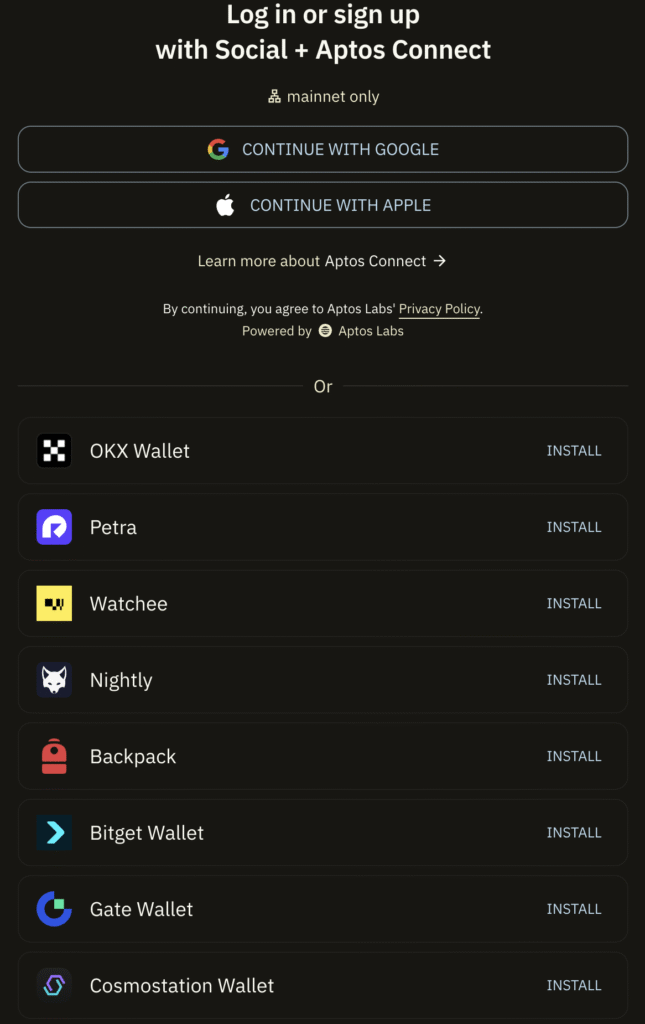
For this guide, we will use the Petra wallet developed by Aptos Labs as an example. However, you can opt for any other wallet from the list above; the process for staking APT tokens will remain largely similar across different wallets. Let’s begin with the Petra wallet.
Aptos Wallets
For this guide, we will use the Petra wallet developed by Aptos Labs as an example. However, you can opt for any other wallet from the list above; the process for staking APT tokens will remain largely similar across different wallets. Let’s begin with the Petra wallet.
Step 1. Add the Petra Wallet to Chrome
Begin by adding the Petra wallet to your Chrome browser. You can do this by visiting the Chrome Web Store by clicking the link to the wallet on the official Petra website. Once you’ve located the extension, press Add to Chrome and follow up by clicking Add extension. This will install the Petra wallet extension to your Chrome browser.

Step 2: Create a Wallet
- Upon successful installation of the extension, you’ll be automatically redirected to the main page.
- Here, you’ll need to create a new wallet. Click the Create New Wallet button, enter a secure password, and hit Continue.
- A recovery phrase will be generated for you – make sure to save this and write it down in a secure location.
- Press Continue and input the recovery phrase that you just saved. This step is crucial as your recovery phrase is the key to restoring your wallet in case of loss or theft.

Step 3. Transfer APT Coins to Your Petra Wallet
After successfully installing the Petra wallet extension, you’ll need to populate your wallet with APT coins.
- First, locate the extension button at the top-right corner of your browser window.
- Click on it and find the Petra wallet among your listed extensions.
- Open Petra Wallet, and you’ll find your wallet address displayed in the top left corner. Copy this address.
- Now, you can send APT coins to this address from exchanges such as Binance or from other sources.
- If you prefer, you also have the option to buy APT coins directly via your Petra wallet by clicking on Buy.
Once you’ve successfully added APT coins to your wallet, you’re ready for the next step.

Step 4: Connect Your Petra Wallet to the Aptos Explorer
The next step involves linking your Petra wallet to the Aptos Explorer.
- After ensuring that your wallet contains APT coins, navigate to the Aptos Explorer website.
- Look for the Connect Wallet option and click on it.
- In the list of available wallets, select ‘Petra’.
Your Petra wallet, loaded with APT coins, is now connected to the Aptos Explorer.

Step 5: Stake Your APT Coins with the Everstake Validator
- Now that your wallet is equipped with APT coins, it’s time to start staking.
- To stake, navigate to the Everstake validator’s page.
- Once there, click the Stake button.
- This action will initiate a transaction that you’ll need to confirm within your Petra wallet.
Remember, staking involves committing your coins to the network to help validate transactions, and in return, you’ll earn staking rewards.


Aptos Staking
And there you have it! You’ve just walked through the simple steps of staking APT tokens via the Aptos Explorer.
By staking, you’re not sitting on the sidelines but actively supporting your chosen validator, earning rewards, and even having a say in the blockchain’s governance.
We used the Petra wallet in this guide, if you’re using a different wallet, the process is pretty much the same.
Ready to Stake Your APT?
Staking starts at just 11 APT
Share with your network